Seatwell

Free · No sign-up · Saves in this browser

Wedding seating plan maker

Make your wedding seating plan here for free, with no sign-up: add your guests, sort them onto tables and print your table plan.

Opening your plan…

Make your wedding seating plan in 4 steps

All four steps are free. Seatwell keeps your plan in this browser while you work, on a laptop or a phone.

  1. 01

    Add your guest list

    Paste names from a spreadsheet, type them one per line, or choose a CSV file. If your list has party, meal or notes columns, they come along too.

  2. 02

    Keep families together

    Put everyone in a household under one party name, such as "The Evans family". Seat one of them, and Seatwell asks if the others should join them.

  3. 03

    Set out the top table

    Add a top table for the wedding party (the editor calls it a head table), or a sweetheart table for two. Then add round or long tables for everyone else, with up to 40 seats each.

  4. 04

    Keep the peace

    Tick two guests who shouldn't sit together, and Seatwell shows a warning if they share a table. It also keeps a running meal count for every table.

Start from a table plan template

Not sure how to lay out the room? Open a ready-made wedding seating plan template, such as a top table with rounds of 10, three long banquet tables or a U-shape. It's added to your plan as a new layout, so your guest list stays as it is. Then seat your guests and change any table you like.

See the wedding table plan templates

Wedding pass

A find-your-seat page for the day

With the Wedding pass, guests scan the QR code on your "Find your table" sign, or open a link you send them. Each guest types a few letters of their name to see their table. If you move someone the night before, guests see the new table once your change is saved online.

  • Guests see only the names that match what they type. The page never lists every guest.
  • A search needs at least 3 letters and shows up to 5 matches.
  • When the plan changes, the QR sign doesn't. There's nothing to reprint.
  • The page is hidden from search engines and closes 60 days after your wedding.
Wedding pass

Meal counts and dietary notes for your caterer

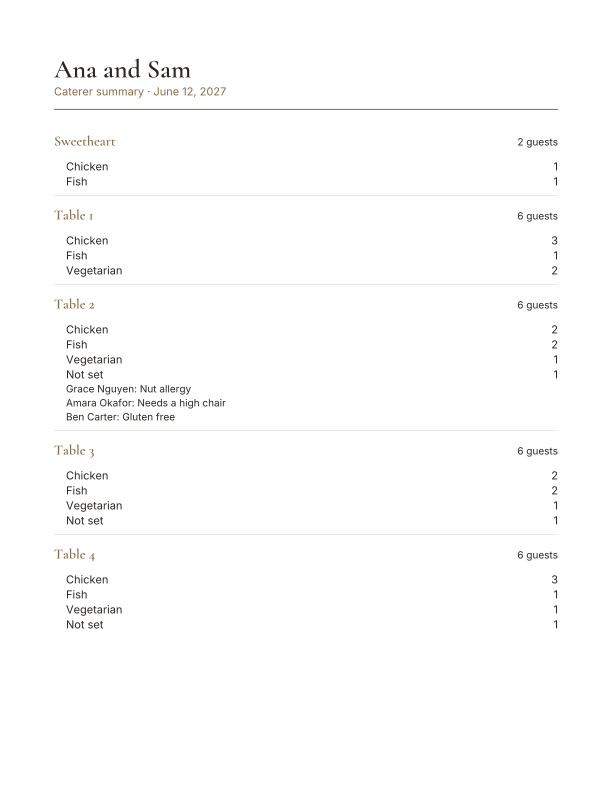
With the Wedding pass, you get a PDF of each table's meal numbers and dietary notes, plus a CSV of who sits where that opens in Excel. Send both to your caterer and venue the week before.

  • Caterer report, as a PDF. Each table's guest count, its meal counts and any dietary notes.
  • Caterer list, as a CSV. Every guest with their table, party, meal and notes. It opens in Excel or Google Sheets, so your venue can sort it however they like.
  • Made from the layout on screen. After a change, download them again and the counts are up to date.
Preview of a caterer report: guest count, meal counts and notes for each table of a sample wedding
ana-and-sam-caterer-report.pdf
TableGuestMeal
SweetheartAna LopezFish
SweetheartSam ReedChicken
Table 1Maya PatelVegetarian
Table 1Arjun PatelChicken
Table 1Lena FischerFish
Table 1Tom BeckerChicken
Table 1Ruth BeckerChicken
ana-and-sam-caterer-list.csv, first 7 of 26 rows

Your table plan, signs and cards

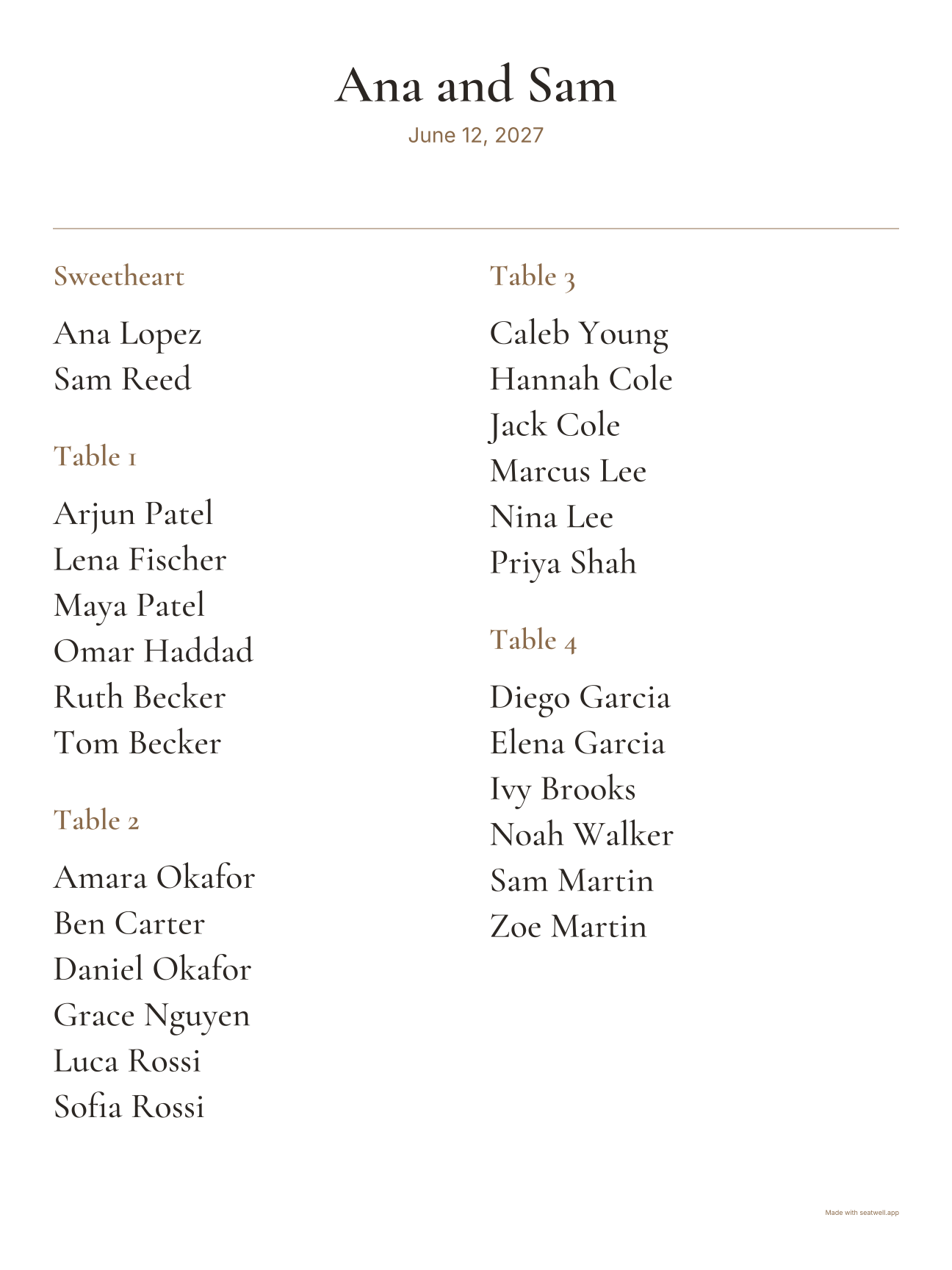
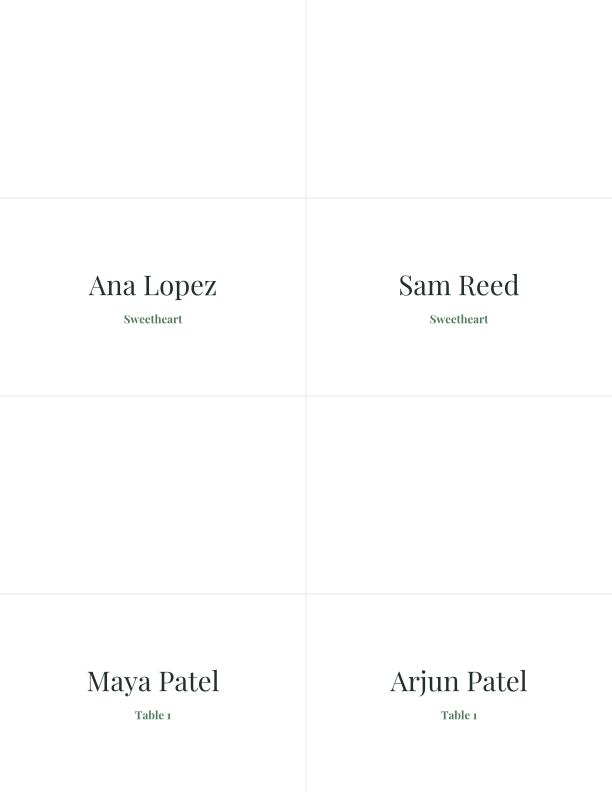
We drew these from a sample wedding, with the code that makes your real files. The seating list and the Classic sign are free. Personalised place cards come with the Wedding pass.

  • Seating list

    Free

    By table or A to Z, on Letter or A4. Print it from your browser, or save it as a PDF from the print window.

  • Preview of the free Classic seating sign, by table, for a sample wedding

    Seating sign

    Free

    The Classic design is free, at 18 × 24 in or 24 × 36 in, by table or A to Z. Free signs carry a small “Made with seatwell.app” line in the corner.

  • Preview of a sheet of Garden place cards for a sample wedding

    Place cards

    Wedding pass

    Tent cards, 4 to a Letter sheet, in all three designs. The pass also adds escort cards, table numbers, and the Garden and Modern signs.

Your seating list prints on A4. Choose A4 in the print window. Seating signs are 18 × 24 in (457 × 610 mm) or 24 × 36 in (610 × 914 mm), as a PDF. Seatwell makes the file. It doesn't print or post boards, so take the PDF to a local print shop and ask for a proof first. Seatwell tells you when names would print small for the sign size. Place cards, escort cards, table numbers and the QR sign are set out on US Letter sheets, which are a little wider and shorter than A4. If you print them at home on A4, try one sheet first.

Free, and what the Wedding pass adds

The planner, your A4 seating list and the Classic sign are free. Pay once for the extras below, only if you want them. The price is in US dollars.

Free

$0No account needed

  • The full editor, for up to 2,000 guests and 300 tables, the same limits as the pass
  • Saved in this browser, with a backup file you can download any time
  • Plain print, by table and A to Z
  • One sign design, with a small “Made with seatwell.app” line

Wedding pass

$15 + tax where it applies

Paid once for one wedding. No subscription.

  • A live find-your-table page and QR sign
  • An edit link for your partner or planner
  • Caterer and venue reports, as PDF and CSV
  • Saved online, so you can open it on any device
  • All 3 sign designs with no credit line, plus place cards, escort cards and table numbers

You buy the pass from inside the editor. Paid items there show a Wedding pass label, so nothing comes as a surprise. You can get a full refund within 14 days. Read the refund terms.

Wedding seating plan questions

Is the wedding seating plan maker free?
Yes. Add your guest list, seat everyone, save your plan and print your table plan without paying. There's no sign-up, and the free version holds up to 2,000 guests and 300 tables. The Wedding pass is optional.
Can I add a top table?
Yes. In the editor, a top table is called a head table. Add one and give it up to 40 seats. Guests sit along one side, facing the room. There's also a sweetheart table for two, plus round, rectangle and long banquet tables.
Can I print my table plan on A4?
Your seating list prints on A4 or US Letter, by table or A to Z. Seating signs are bigger: 18 × 24 in (457 × 610 mm) or 24 × 36 in (610 × 914 mm). Place cards, escort cards, table numbers and the QR sign come on US Letter sheets.
Do you print and post the seating plan board?
No. Seatwell gives you a print-ready PDF of your sign. Take it to a local print shop, and ask for a proof before they print the final board.
Is it a seating plan generator?
It helps, but it doesn't decide for you. Add your guests before any tables, and Seatwell suggests how many round tables of 8 you need. One tap adds them. You choose who sits where. It then makes your seating list and sign, and personalised place cards with the pass.
How much is the Wedding pass?
It's $15 + tax where it applies, paid once for your wedding, and the price is in US dollars. It isn't a subscription. If you change your mind, you can get a full refund within 14 days.
How long do you keep our guest list?
A free plan stays in your browser and is never sent to us. With the Wedding pass, the guest page closes 60 days after your wedding date. All event data, including guest names, is deleted 90 days after it. You can delete the event sooner at any time.
Planning a wedding in the US? Use the wedding seating chart maker. Not a wedding? The free seating chart maker works for any party with tables.